What’s new in Search Console
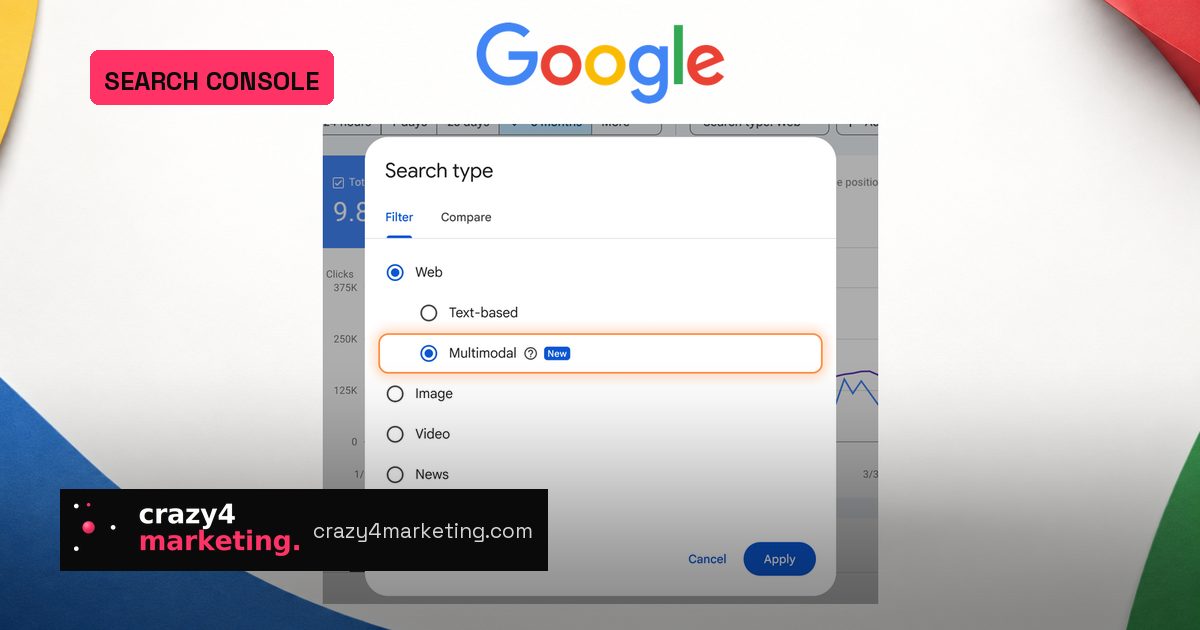
Google is rolling out a multimodal filter inside the Search Console Performance report, globally starting September 24. The filter sits under the Web search type and splits traffic into two buckets: text-based queries and multimodal searches, where an image was used as part of the search.
The new signal covers Google Lens, Circle to Search on Android, image uploads into Google Search, and the Chrome right-click “Search this image” option. As Google puts it, the update is designed to show how your content surfaces when users search using images.
What you can and can’t see
The big practical caveat: multimodal traffic comes without query data. Google’s help documentation explains that because these searches mostly use images rather than text, the specific query text isn’t available. The queries tab simply isn’t available when the multimodal search type is selected.
What you do get is page-level performance. For any URL receiving clicks from image-based searches, you can see which pages are winning, and compare them against text-driven traffic by country and device. The metrics only appear for sites that actually receive this type of traffic.
Start with this checklist:
- Which product, category and visual pages earn multimodal clicks.
- Country and device splits versus your regular text search traffic.
- Whether any page is heavily image-search dependent, shaping how you prioritize visual assets.
Why this matters for performance marketers
For e-commerce and D2C teams, image-based search is a direct line from a photo or screenshot to a product page. Until now, that behavior was invisible inside Search Console. The new filter turns it into a monitoring signal. If a page gets multimodal clicks but weak text-search traffic, its visual assets may be doing the heavy lifting, so alt text, structured data and image quality deserve more attention.
The rollout also extends to the generative AI performance report, which counts impressions rather than clicks. That matters because image-driven discovery often starts before a click. Brands can watch impression-side signals separately from click-driven performance.
A simple framework: segment, export, optimize
Start by selecting the Web search type and the multimodal filter. Export the page-level report using the Export button, then compare it against your text-based pages in the same period. Look for mismatches: high multimodal clicks but low text clicks often indicate visual discovery; high text clicks but low multimodal may suggest your images aren’t distinctive enough.
One limitation to plan around: the Search Analytics API does not currently list a separate multimodal value for the report type parameter. If you pull data programmatically, check your property for the UI filter first and export from there until the API catches up.
What to do next
Don’t wait for every property to show the option. Check Search Console today, compare a full day of Web totals once the split appears, and document your baseline. Then prioritize image-heavy landing pages, especially product detail pages and visual category pages. The filter won’t tell you which image triggered a click, but it will tell you where image-based search is already sending value.
Source: Search Engine Journal