
Google Ads reporting just got a Gemini upgrade. AI Dashboards, announced back in August, have started showing up in real advertiser accounts.
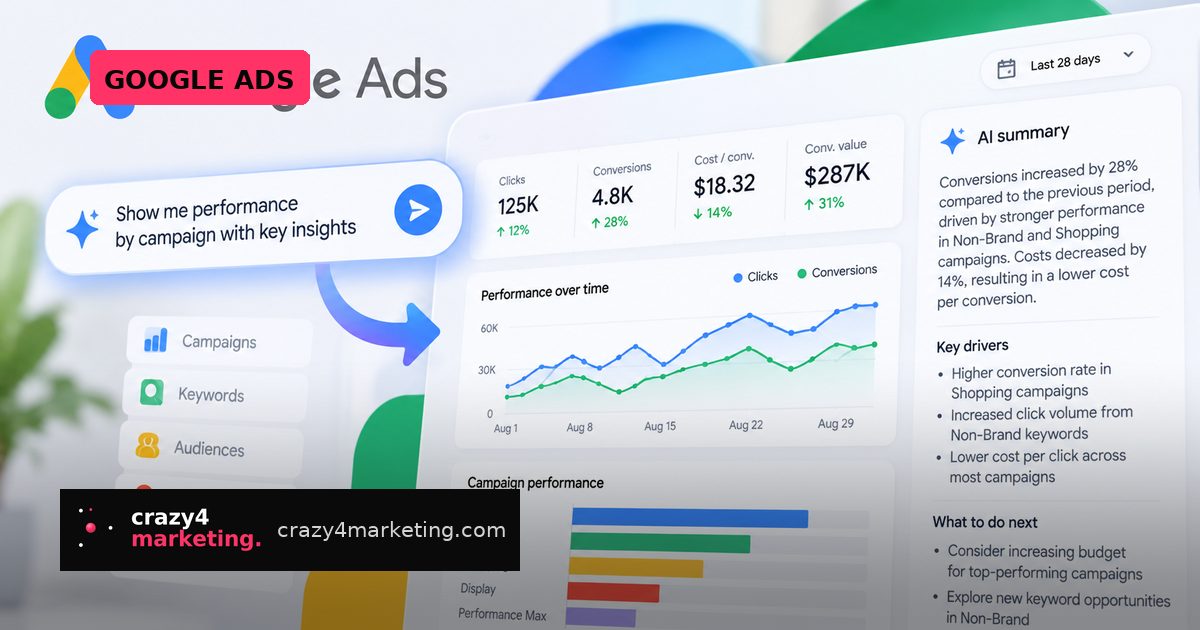
The pitch is simple: type what you want to analyze, and Google builds the visualization for you.
What’s actually shipping
Instead of hand-picking metrics, dimensions and chart types to chase down a performance dip, you describe the question in plain language. Google generates the report.
Each report also ships with a real-time AI summary that, according to Google, explains the “why” behind the numbers, not just the numbers themselves. So the dashboard is meant to surface what changed and what might be driving it.
The rollout was first spotted by paid search specialist Thomas Eccel, who posted about it on LinkedIn.
Why this matters for performance teams
Report building has always been the tax you pay before you get to do the actual thinking. Selecting dimensions, wrestling with segments, exporting to Sheets, rebuilding it next month. AI Dashboards move that grunt work to Gemini.
That’s a real time saver for agencies running dozens of accounts and for lean in-house teams with no analyst on staff.
But look at the bigger pattern. This is the third AI layer Google has slid between advertisers and their own data, alongside AI-powered insights on the Ads homepage and Ask Advisor, the in-product AI agent. The direction of travel is clear: you ask questions in natural language rather than navigating reports yourself.
Convenient? Yes. It also means the interpretation layer increasingly belongs to Google, not to you.
How to use it without switching your brain off
Treat AI Dashboards as a first draft, not a verdict. A few habits that will keep you honest:
- Verify the first few outputs. Rebuild one AI-generated report manually and check the numbers line up before you trust it in a client deck.
- Be specific in prompts. “Why did conversions drop?” gets you a generic answer. Name the campaign, the date range and the comparison window.
- Interrogate the summary. If the AI says a bidding change drove the shift, check whether seasonality, tracking gaps or a landing page issue could explain it instead.
- Keep an external source of truth. Your CRM or backend revenue data should still be the final word on performance, not a platform-generated narrative.
- Document your own hypothesis first. Write down what you think happened, then see if the AI agrees. That’s how you keep your diagnostic skills sharp.
The skill that’s actually appreciating
If a machine can build the chart, building charts stops being a differentiator. What becomes more valuable is the layer above it: knowing which question to ask, spotting when the answer smells wrong, and translating a data pattern into a media decision.
A useful way to frame it. Reporting has three jobs: collect, explain, decide. Google is automating collect and taking a swing at explain. Decide is still entirely on you, and that’s where your margin lives.
Practically speaking, this also changes how agencies should talk about deliverables. If your monthly retainer is priced partly on “we build you a custom dashboard,” that value story is eroding. Reposition around strategy, testing velocity and incremental outcomes before a client notices they can prompt their own report in ten seconds.
What to do this week
Check whether AI Dashboards have landed in your accounts yet, since the rollout appears to be partial. If they have, run three prompts you’d normally spend an hour on manually and compare quality.
If they haven’t, start writing down the recurring reporting questions your team answers every month. Those become your prompt library the moment the feature arrives.
Faster reports are only a win if they lead to faster, better decisions. Everything else is just prettier screenshots.
Source: Search Engine Land